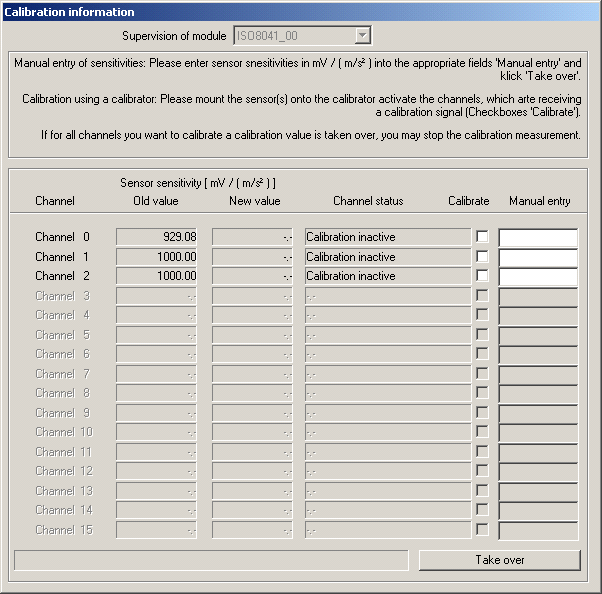
If you select Calibration and leave the settings dialogue with OK, the next measurement taken is used as calibration measurement.
Than you mount your sensors successively onto you calibrator (or at the same time, if you have more than one calibrator with the same acceleration value) and activate the channel(s) receiving a calibration signal by checking the appropriate checkbox ‘Calibrate’.
The software display the status of the activated channels. As soon as a signal is stable for a while, the calibration value is calculated and displayed. This may need some seconds, because the time constant is set to 8 s for calibration.
Manual entry of sensor sensitivities
If you clicked ‚Entry‘ the same dialogue is shown, but the channels cannot be activated for calibration using a calibrator. You may enter the sensitivities of the sensors manually in mV / (m/s²) in the fields ‚Manual entry‘. Click ‚Take over ‘, to take over the values entered. If field did not contain a valid sensitivity value, the value remains visible, else the entry field is cleared and the value taken over is display in the field ‚New Value‘.
If for all channels you want to calibrate a calibration value is taken over, you may leave this dialogue with ‚OK‘, if all entries are alright, else with ‚Cancel‘.

Hints on calibration
For calibration the band pass of hand-arm-vibrations (6,3 Hz .. 1259 Hz) is used. A static calibration has to be done with DASYLab - means. If you need a static calibration urgently, please let us know ( ).
).
For calibration frequency weighting is switched off. Time weighting is set to moving average, linear averaging, time constant 8 s.
If the calibration status toggles between Channel is creeping down and Channel is creeping up the cause might be a beat frequency of the calibrator vibration and the scan rate. In this case please try another scan rate.